Filter options show all values instead of used ones in category page.
-
Hi Bagisto Community,
I’m facing an issue with category attribute filters in Bagisto 2.3.6.
Scenario:- I have a Brand attribute with ~150 options (Intel, AMD, MSI, ASUS, GIGABYTE, etc.).
- In the Processor category, products only use Intel and AMD.
- In the Motherboard category, products only use MSI, ASUS, and GIGABYTE.
Expected behavior:
On the shop page for Processor, the Brand filter should only show Intel and AMD.
On the shop page for Motherboard, the Brand filter should only show MSI, ASUS, and GIGABYTE.
Current behavior:
The Brand filter always shows all attribute options, regardless of which are actually used in the category.
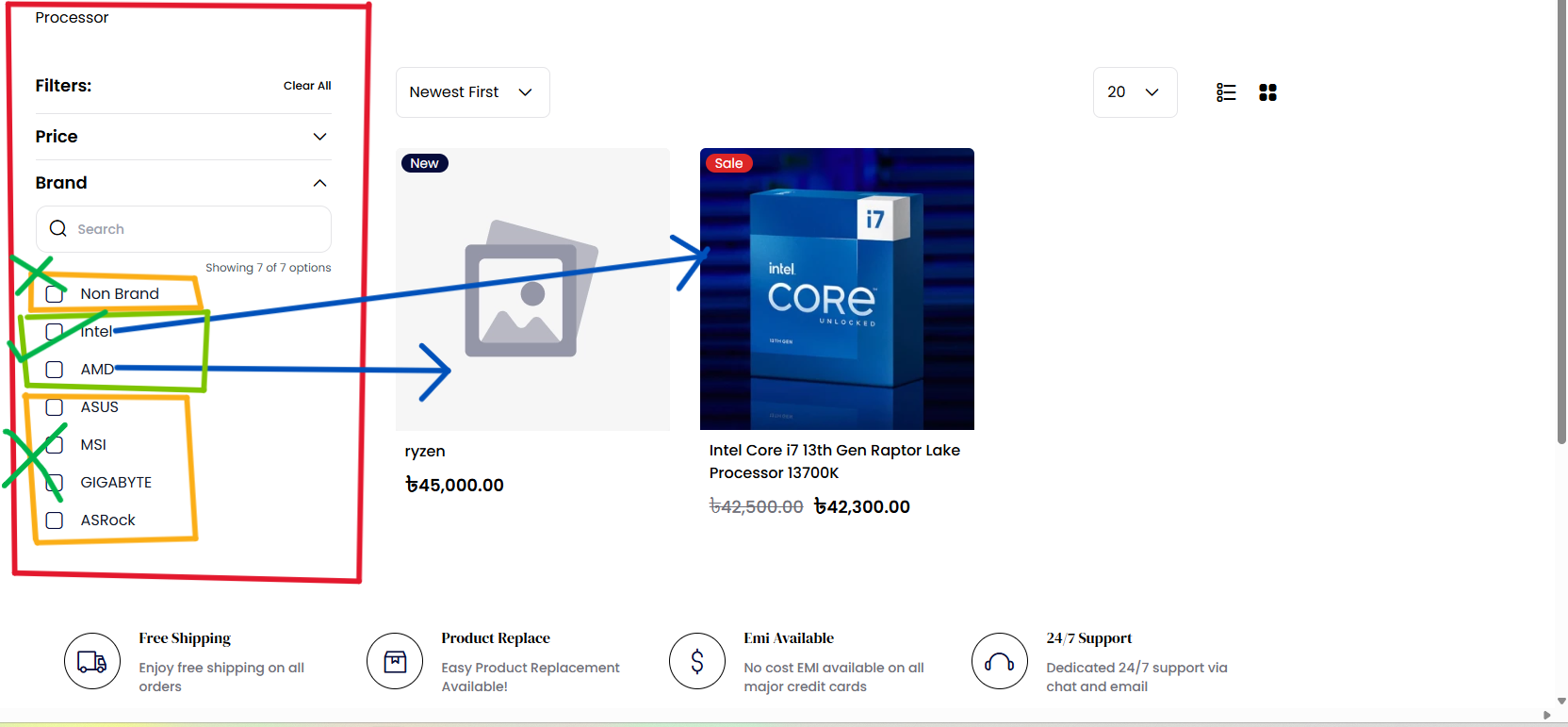 Question:
Is there a recommended way in Bagisto 2.3.6 to configure layered navigation so that attribute filters only display options used in the current category?
Environment:
Bagisto 2.3.6 with Redis and Elasticsearch running in Docker.
Any guidance, patch, or recommended approach would be greatly appreciated.
Thanks in advance!
-
Hi,
Thanks for the detailed explanation! Here's what's going on, in plain terms.
What's happening
In Bagisto 2.3.6, the Brand filter is designed to show every option you created for that attribute all, ~150 brands, no matter which ones are actually used in the category you're viewing. So on both the Processor and Motherboard pages, you see the full brand list.
This is how Bagisto works out of the box. It's not a bug or a setting you missed, the filter simply doesn't check "which brands are actually used by products in this category" before showing the list.
Does Elasticsearch or Redis fix it?
No. I checked, and even with Elasticsearch running, Bagisto only uses it to speed up product search and price ranges. It does not narrow down the filter options to what's used in a category. So there's no toggle in the admin panel or in Redis/Elasticsearch that will turn this on.
What you can do
To get the behavior you want (Processor page shows only Intel + AMD, Motherboard page shows only MSI/ASUS/GIGABYTE), you needs to make a small customization. It's a well-understood change:
- The category page currently asks for "all brands."
- The customization makes it instead ask for "only the brands used by products in this category."
It's a focused change to one part of the storefront code, and it doesn't require rebuilding your site or changing your data, just a small custom addition.
Thanks
Aviral