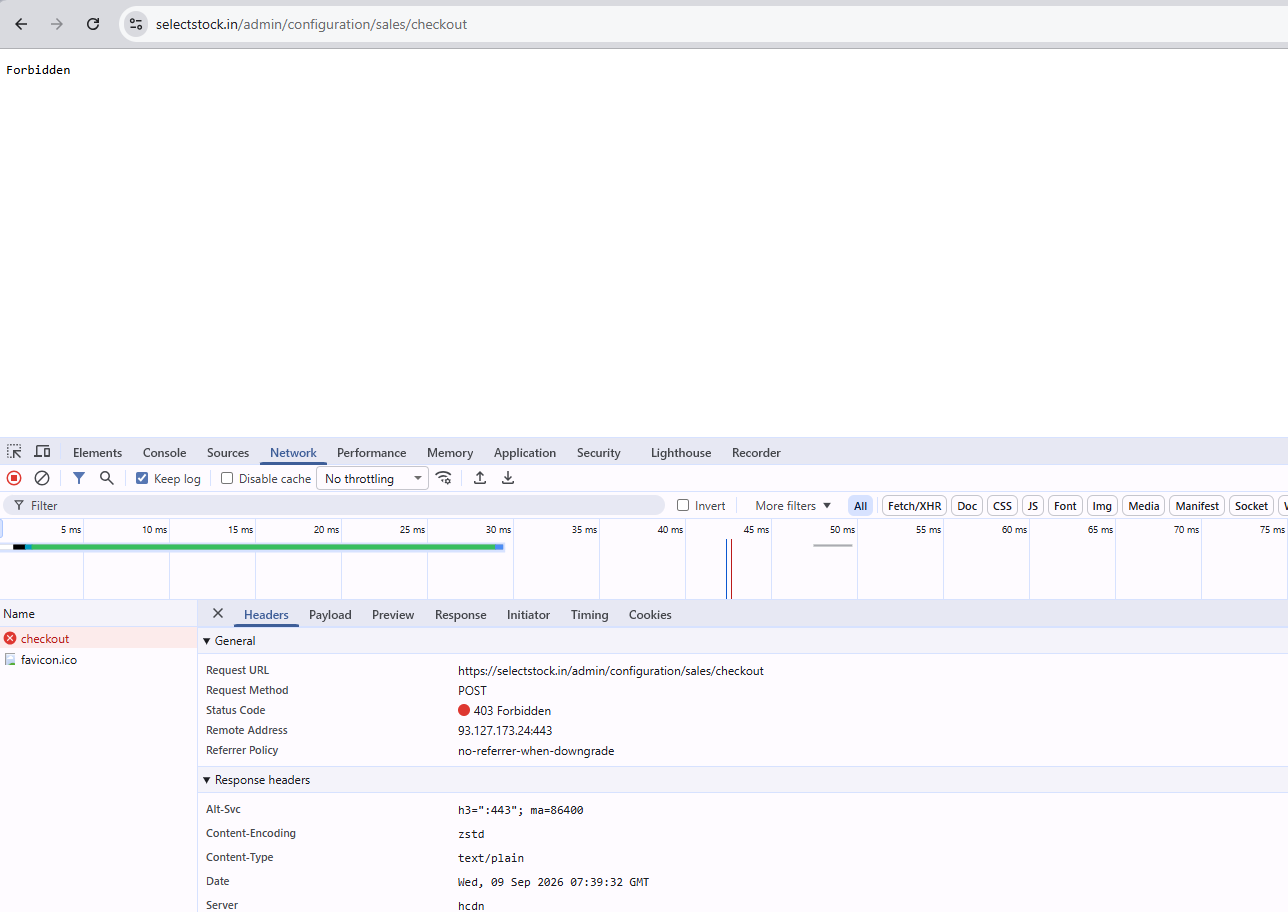
Unable to Update Configuration Settings – 403 Forbidden in Bagisto 2.4
-
Hi Bagisto Team,
Yesterday, I was trying to update the Payment Method settings from the Configuration section in Bagisto, but I was continuously getting a 403 Forbidden error whenever I tried to save the changes.
At that time, a support member suggested that I update my Bagisto installation from the master branch to the latest 2.4 branch.
I updated my installation to the latest 2.4 version, and the Payment Method error no longer occurs. However, I am still facing the same 403 Forbidden error in other modules under the Configuration section.
It seems that the issue is not limited to the Payment Method configuration and may be related to the configuration save/update functionality or permissions.
Could someone please guide me on:
What could be causing the 403 Forbidden error across the Configuration modules?
Is there any additional migration, permission, cache, or configuration change required after updating from the master branch to 2.4?
Is there any recommended way to properly update/sync the latest 2.4 branch in an existing Bagisto installation?
Are there any specific routes, middleware, CSRF, ACL/permission, or server configuration settings I should check?Current situation:
Previous version: Master branch
Updated version: Latest 2.4 branch
Payment Method: Working after the update
Other Configuration modules: Still returning 403 ForbiddenAny guidance on how to properly resolve this issue would be greatly appreciated.
Thank you.
-
-
Hi @gkdev ,
Thanks for the clear details. A 403 Forbidden while saving Configuration is
usually caused by one of the three things below. Please check them in this order.- Server security rule (the most common cause)
Most servers run a security firewall (like ModSecurity / WAF). It can block a
"Save" when one of the setting fields contains characters it treats as unsafe -
for example < > quotes, a URL, or code-like text. This is why some Configuration
pages save fine and others give a 403.
- Ask your hosting/server team to open the web server error log (Apache or
Nginx) at the exact time you got the 403. - If a security rule is blocking it, ask them to allow/whitelist your admin
save URL: /admin/configuration.
Tip to confirm this: a plain white "403 Forbidden" page means the server blocked
it. A Bagisto permission problem instead shows the styled Bagisto "Unauthorized"
screen, and a CSRF problem shows a "419" page - so those two are likely not your
issue here.- Admin role permissions
After moving to 2.4, an existing role can be left without full rights.
- Go to Settings > Users > Roles, open your role, set Access Control to "All",
and save it. - Log out, log back in, and try saving again.
- Old cache left over from the update
After any version update, run the migrations and clear all caches:
php artisan migrate
php artisan optimize:clear
php artisan route:clear
php artisan config:clear
php artisan view:clear
Recommended way to update master -> 2.4 in an existing install:
- Take a full backup first (both files and database).
- Pull the 2.4 code.
- Run: composer install
- Run the migrate + cache-clear commands listed above.
- Rebuild the admin assets if needed:
cd packages/Webkul/Admin
npm install && npm run build
If you can share that one error-log line from a failed save, we can tell you
exactly which rule is blocking it.Thanks.
Aviral
Bagisto Team - Server security rule (the most common cause)
-
HI Aviral
i'm try but not show any error.
notice one point. whenever select any upload image then give me this 403 -
@admin
catch one error in last night[2026-09-09 19:11:21] local.ERROR: Uncaught ReferenceError: adjustSubMenuPosition is not defined https://selectstock.in/admin/configuration/sales/taxes 1169 18 ReferenceError adjustSubMenuPosition is not defined ReferenceError: adjustSubMenuPosition is not defined
at HTMLDivElement.onmouseenter (https://selectstock.in/admin/configuration/sales/taxes:1169:18) {"url":"https://selectstock.in/admin/configuration/sales/taxes","user_agent":"Mozilla/5.0 (Windows NT 10.0; Win64; x64) AppleWebKit/537.36 (KHTML, like Gecko) Chrome/152.0.0.0 Safari/537.36","timestamp":"2026-09-09T13:41:22.376Z"} -
Hello, @gkdev
Greetings!
As you confirmed, you were previously working on the master branch, which contains the newer Bagisto 2.5 version, and then switched to the 2.4 branch.
Please note that once Bagisto has been installed, you cannot move back to an older version simply by switching branches. If you need to use the older branch/code, you will need to reinstall Bagisto using the required version.
If your project contains any production data, we strongly recommend that you do not downgrade or switch to an older version, as the database structure of a newer Bagisto version may not be compatible with an older version.
If you do not have any production data and want to start with a fresh Bagisto 2.4 installation, you can clone the Bagisto 2.4 branch and install it using:
composer install
php artisan bagisto:install
Note: If you have any important data, customizations, or changes, please make sure to take a complete backup before reinstalling.
Also, please note that the database of a newer Bagisto version cannot simply be used with an older Bagisto version, as the database structure and migrations may differ between versions.
Regarding the 403 Forbidden Error
The 403 Forbidden error is generally related to server configuration or file permissions. Please ensure that the web-server user has the required read/write permissions for the Bagisto application directories.For a standard Linux server using www-data as the web-server user, you can use the following commands from the Bagisto project directory:
sudo chown -R www-data:www-data storage bootstrap/cache
sudo chmod -R 775 storage bootstrap/cache
If your web server uses a different user, such as nginx or nobody, replace www-data with the appropriate web-server user.
You can check the web-server user based on your server configuration/processes before applying the ownership command.
If the issue persists, you can also ensure that the Bagisto project directories are accessible by the web server:
sudo chmod -R 755 /path/to/bagisto
sudo chmod -R 775 /path/to/bagisto/storage
sudo chmod -R 775 /path/to/bagisto/bootstrap/cache
Please replace /path/to/bagisto with your actual Bagisto project path.
After updating the permissions, clear the application cache:
php artisan optimize:clearImportant: We recommend avoiding chmod -R 777 on the Bagisto project, as it provides unnecessarily broad permissions and is not recommended for a production server.
Thank you.
Aviral
Team Bagisto